
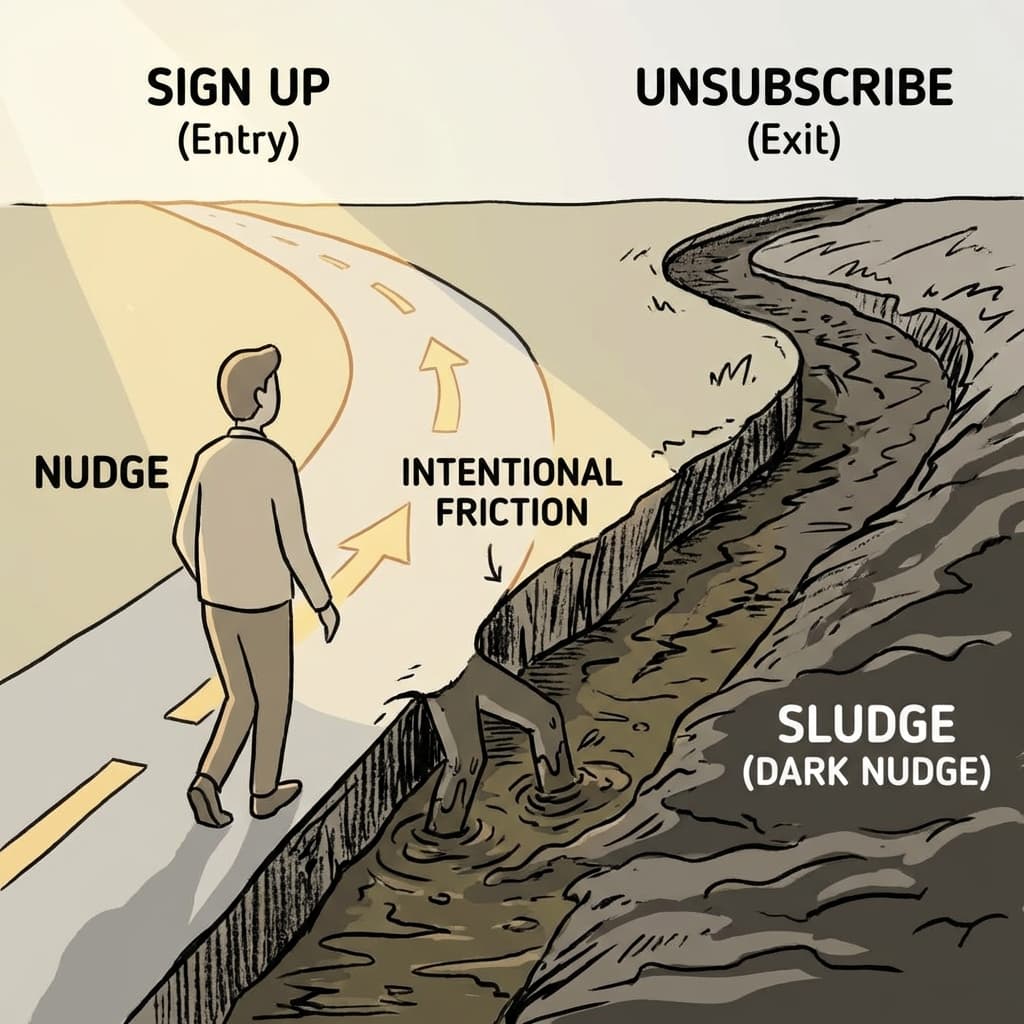
この記事の要点(UIXHERO視点) UIXHEROでは、スラッジを「意図的な泥沼、ユーザーへの背信行為」と捉える。 本記事では、解約や設定変更を不当に難しくする「悪い摩擦」が、短期的利益と引き換えにブランドへの信頼を恒久的に破壊することを警告し、真のロイヤルティは「いつでも去れる自由」から生まれることを説く。
スラッジとは?
行動経済学者リチャード・セイラーが命名した概念で、 人々が望む行動をとるのを妨げる、意図的または非意図的な「泥沼(ヘドロ)」のような摩擦 のことです。 良い行動を促す「ナッジ(Nudge)」の対義語として使われます。
特に、企業が利益を守るために、解約、返金、プライバシー設定の変更などを 意図的に難しくするデザイン を指すことが多く、これはダークパターンの一種とみなされます。
UXデザインでの活用事例(撲滅編)
1. サブスクリプションの解約
「入り口と同じくらい広く出口を作る」のが原則です。1クリックで登録できたなら、1クリック(または2クリック程度)で解約できるように設計します。これにより、ユーザーは「いつでも辞められる」という安心感を持ち、逆に登録率が上がることがあります。
2. オプトアウトの簡素化
メルマガの配信停止や、クッキーの拒否設定において、複雑なチェックボックスや難解な説明文を使わず、「すべて拒否」などの明確なボタンを用意します。
3. 公的書類・申請フォーム
行政手続きなどの複雑なフォームは、それ自体がスラッジです。入力項目を減らす、専門用語を平易にする、進捗状況(プログレスバー)を表示するなどのUX改善は、まさにスラッジの除去と言えます。
実装例: スラッジ体験デモ
「登録」と「退会」。情報の透明性とアクセスのしやすさにどれだけの差(スラッジ)があるかを感じるデモです。
Interactive Example (Live)
const ArrowRight = ({ className }) => ( <svg xmlns="http://www.w3.org/2000/svg" width="24" height="24" viewBox="0 0 24 24" fill="none" stroke="currentColor" strokeWidth="2" strokeLinecap="round" strokeLinejoin="round" className={className}> <path d="M5 12h14" /> <path d="m12 5 7 7-7 7" /> </svg> ); const AlertTriangle = ({ className }) => ( <svg xmlns="http://www.w3.org/2000/svg" width="24" height="24" viewBox="0 0 24 24" fill="none" stroke="currentColor" strokeWidth="2" strokeLinecap="round" strokeLinejoin="round" className={className}> <path d="m21.73 18-8-14a2 2 0 0 0-3.48 0l-8 14A2 2 0 0 0 4 21h16a2 2 0 0 0 1.73-3Z" /> <path d="M12 9v4" /> <path d="M12 17h.01" /> </svg> ); const SludgeDemo = () => { const [isSubscribed, setIsSubscribed] = useState(false); const [sludgeStep, setSludgeStep] = useState(0); // 登録は一瞬 (No Suldge) const handleSubscribe = () => { setIsSubscribed(true); setSludgeStep(0); }; // 退会は泥沼 (High Sludge) const handleUnsubscribeStart = () => setSludgeStep(1); const handleKeepSubscribing = () => setSludgeStep(0); // 引き止め成功 const handleNextSludge = () => setSludgeStep(p => p + 1); const handleFinalUnsubscribe = () => { setIsSubscribed(false); setSludgeStep(0); }; if (!isSubscribed) { return ( <div className="p-8 bg-card rounded-xl shadow border text-center"> <h3 className="text-2xl font-bold mb-4 text-primary">プレミアム会員になろう</h3> <p className="mb-6 text-muted-foreground">登録はたったの3秒。いつでも解約できます。</p> <button onClick={handleSubscribe} className="w-full py-3 bg-primary text-primary-foreground font-bold rounded-full shadow-lg hover:opacity-90 transition-transform active:scale-95 flex items-center justify-center gap-2" > 今すぐ登録する <ArrowRight/> </button> </div> ); } return ( <div className="p-6 bg-card rounded-xl shadow border"> <div className="flex justify-between items-center mb-6 pb-4 border-b"> <span className="font-bold text-green-600 flex items-center gap-2">✓ プレミアム会員</span> <span className="text-xs text-muted-foreground">次回更新: 2030年1月1日</span> </div> {sludgeStep === 0 && ( <div className="space-y-4"> <p>会員限定コンテンツをお楽しみください。</p> <div className="pt-8 text-right"> {/* スラッジ: 退会リンクを目立たなくする */} <button onClick={handleUnsubscribeStart} className="text-xs text-gray-300 hover:text-gray-500 underline"> 退会手続きはこちら </button> </div> </div> )} {/* スラッジ Step 1: 感情的引き止め */} {sludgeStep === 1 && ( <div className="space-y-4 animate-in fade-in slide-in-from-bottom-4"> <div className="bg-yellow-50 dark:bg-yellow-900/20 p-4 rounded text-center"> <AlertTriangle className="mx-auto text-yellow-500 mb-2" /> <h4 className="font-bold text-lg">本当によろしいですか?</h4> <p className="text-sm mt-2">今退会すると、獲得した <span className="font-bold text-red-500">5,000ポイント</span> がすべて失われます。</p> </div> <button onClick={handleKeepSubscribing} className="w-full py-3 bg-primary text-primary-foreground font-bold rounded mt-4"> ポイントを維持して継続する(推奨) </button> <button onClick={handleNextSludge} className="w-full text-xs text-muted-foreground mt-2 hover:underline"> 恩恵を捨てて退会へ進む </button> </div> )} {/* スラッジ Step 2: 認知的負荷(アンケート) */} {sludgeStep === 2 && ( <div className="space-y-4 animate-in fade-in slide-in-from-bottom-4"> <h4 className="font-bold">退会の理由をお聞かせください</h4> <p className="text-xs text-muted-foreground">退会処理を進めるには回答が必須です。</p> <textarea className="w-full p-2 border rounded bg-background" rows={3} placeholder="理由を具体的に記述してください..."></textarea> <div className="flex gap-2 mt-4"> <button onClick={handleKeepSubscribing} className="flex-1 py-2 bg-gray-100 dark:bg-gray-800 rounded font-bold"> キャンセル </button> <button onClick={handleNextSludge} className="flex-1 py-2 border border-red-200 text-red-500 rounded text-sm"> 次へ </button> </div> </div> )} {/* スラッジ Step 3: ラビリンス(最終確認) */} {sludgeStep === 3 && ( <div className="space-y-6 animate-in fade-in slide-in-from-bottom-4 text-center"> <h4 className="font-bold text-xl">最終確認</h4> <p className="text-sm">本当に退会しますか?この操作は取り消せません。</p> <div className="flex flex-col gap-3"> {/* スラッジ: ボタンの配色を逆にする(Confirm Shaming) */} <button onClick={handleKeepSubscribing} className="w-full py-3 bg-primary text-primary-foreground font-bold rounded shadow-lg transform scale-105"> 思いとどまる! </button> <button onClick={handleFinalUnsubscribe} className="w-full py-2 text-xs text-gray-400 hover:text-red-500"> 退会する </button> </div> </div> )} </div> ); }; render(<SludgeDemo />);
実践ガイドライン (Practical Guidelines)
スラッジ監査(Sludge Audit)
倫理的配慮 (Ethical Considerations)
- サン・ステインの問い : 「そのスラッジは、ユーザーが長期的な自己利益を達成するのを助けているか?それとも企業が短期的な利益を得るためのものか?」。もし後者であれば、それは即刻削除すべきです。
